
Introduction
Modern hospitals and clinics need efficient systems to manage patients, doctors, appointments, billing, and medical records. However, manual processes often create delays, increase errors, and reduce patient satisfaction. As healthcare demands continue to grow, hospitals need smarter solutions to improve daily operations.
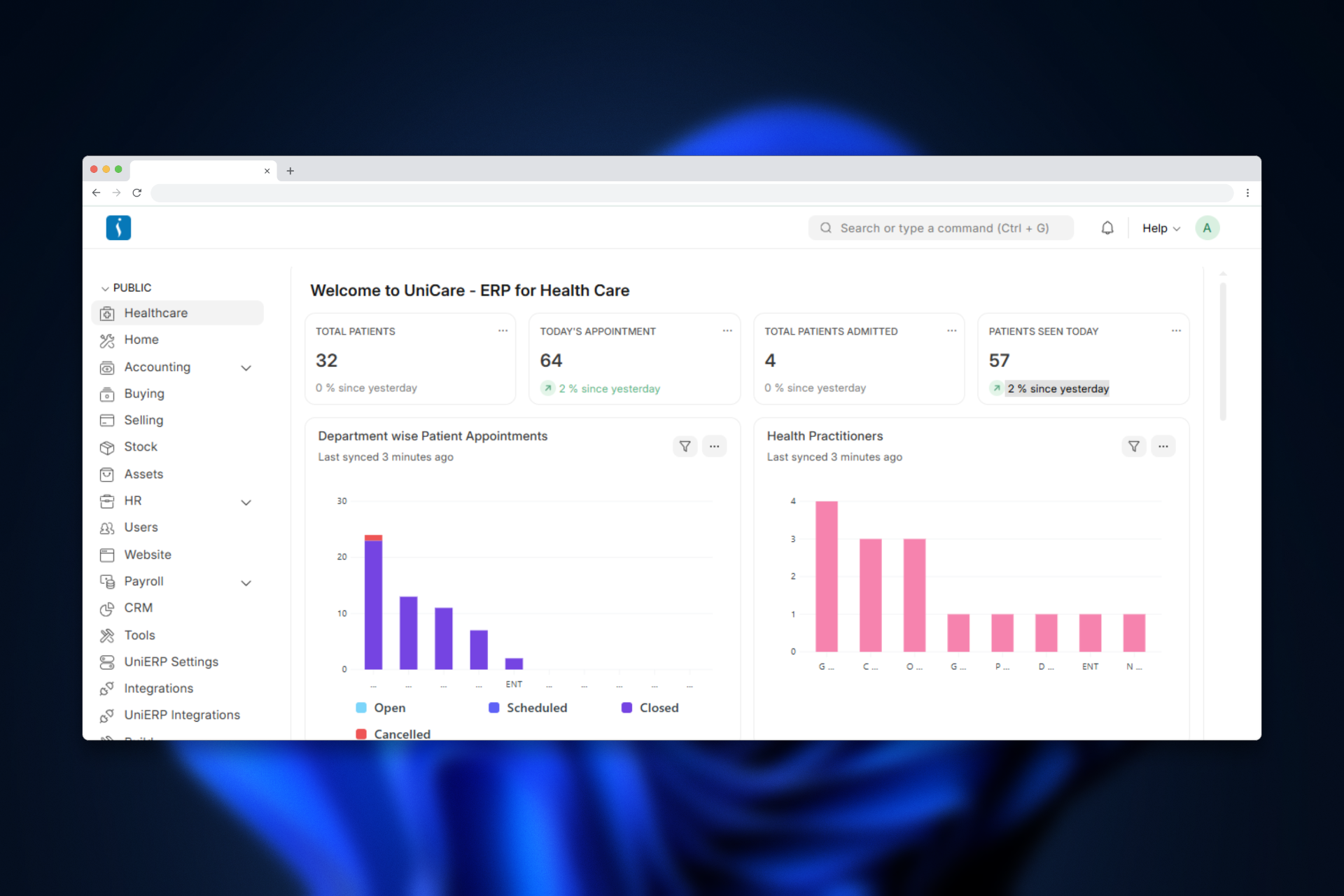
UniCare ERP System provides a complete hospital management solution that streamlines healthcare operations. The system helps hospitals manage patient registration, appointments, laboratory tests, pharmacy operations, billing, and inpatient care from a single centralized platform.
Problems in Traditional Hospital Management
Many healthcare organizations still depend on manual records or disconnected software systems. As a result, hospitals face several operational challenges, including:
- Difficulty managing patient records
- Appointment scheduling conflicts
- Slow billing and payment processing
- Poor communication between departments
- Inefficient laboratory test management
- Increased chances of human error
Consequently, these issues reduce operational efficiency and negatively impact patient care and satisfaction.
What is UniCare ERP System?
UniCare is an ERP-based healthcare management system that connects all hospital operations within one integrated platform. It allows healthcare providers to manage administrative, clinical, and financial activities more efficiently.
In addition, the system automates routine hospital tasks and maintains accurate medical records. Therefore, hospitals can improve workflow efficiency while delivering faster and more reliable healthcare services.
Healthcare Modules in UniCare
1. Masters
The Masters Module in UniCare ERP manages the core master data required for smooth hospital operations. In addition, it stores essential information about patients, doctors, departments, schedules, and care types.
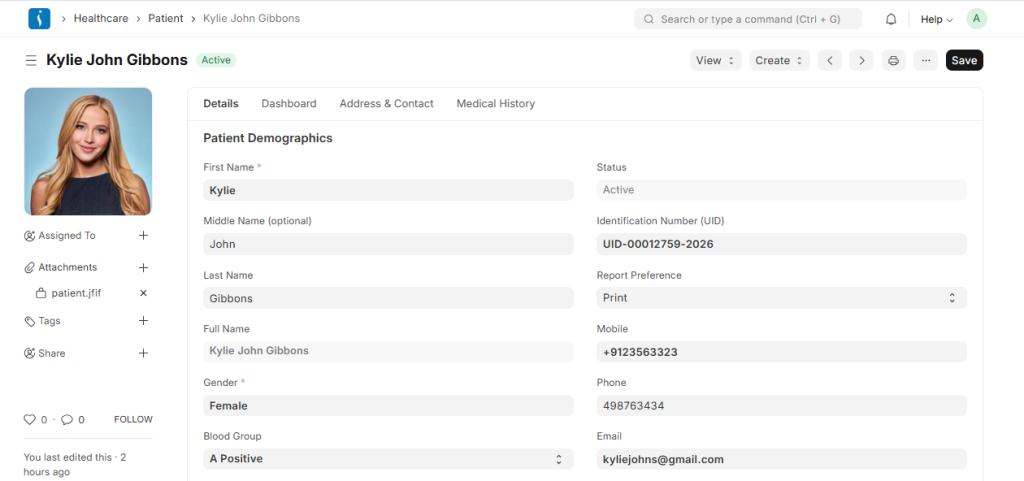
● Patient: The Patient section stores important patient information, including personal details, contact information, and medical history. Furthermore, the system uses these records across appointments, consultations, and treatment processes.
● Healthcare Practitioner: This feature manages the details of healthcare professionals such as doctors, nurses, and therapists. Moreover, it records their specialization, department, and professional information for better staff management.
● Practitioner Schedule: The Practitioner Schedule defines the working hours and availability of healthcare professionals. As a result, hospitals can manage appointments efficiently and reduce scheduling conflicts.
● Medical Department: The Medical Department feature organizes hospital services into departments such as Cardiology, Radiology, Laboratory, and Emergency. Therefore, hospitals can categorize medical services and practitioners more effectively.
● Patient Care Type: This feature identifies the type of care provided to patients, such as inpatient or outpatient services. Consequently, the system can follow the correct treatment workflow for each patient
2. Consultation
The Consultation Module manages the complete patient consultation process, from appointment booking to clinical procedures. Additionally, it helps doctors monitor patient conditions and provide structured treatment plans.
● Patient Appointment: Patients can schedule appointments with healthcare practitioners through this feature. It records appointment dates, timings, departments, and doctor availability. Therefore, hospitals can manage patient flow more efficiently.
● Vital Signs: The Vital Signs section records important health measurements such as blood pressure, body temperature, pulse rate, respiratory rate, and oxygen levels. As a result, doctors can quickly evaluate the patient’s current condition before consultation.
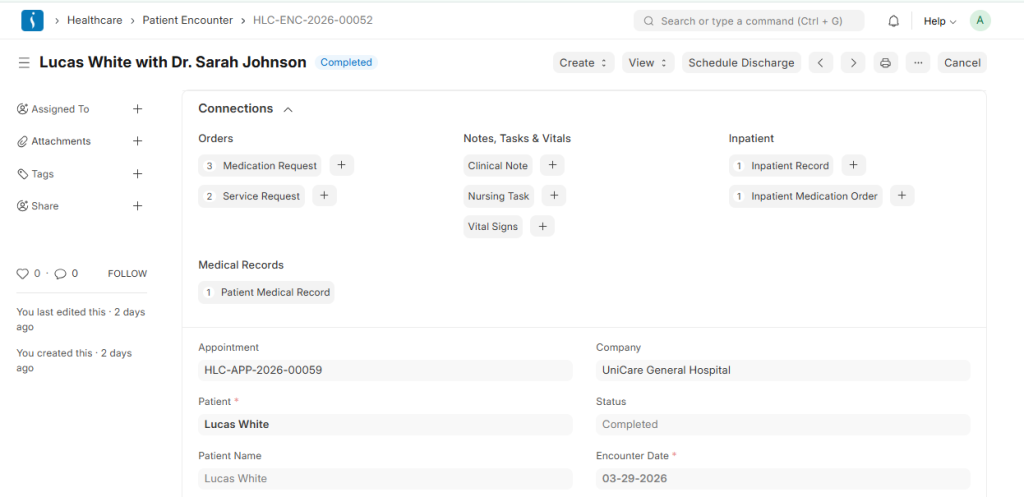
● Patient Encounter: A Patient Encounter represents the consultation between the doctor and the patient. During this process, doctors record symptoms, diagnoses, medications, lab tests, and treatment recommendations.
● Clinical Procedure: Clinical Procedure manages medical procedures such as vaccinations, IV drips, wound dressing, and minor surgeries. Furthermore, the system maintains accurate records for medical documentation and billing purposes.ocumentation and billing.
3. Orders
The Orders Module helps healthcare providers manage and track all medical orders during patient treatment. In addition, it ensures that hospitals process service requests and medication orders accurately.
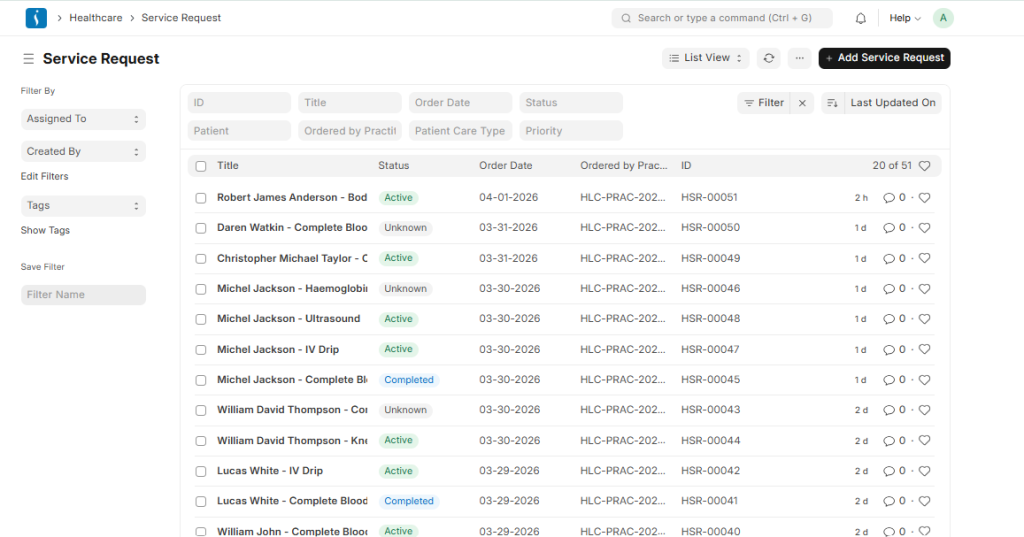
● Service Request:Doctors create Service Requests for healthcare services such as lab tests, imaging services, nursing tasks, or medical procedures. After that, the system forwards the request to the relevant department for execution.
● Medication Request: Doctors use Medication Requests to prescribe medicines for patients. The system records medicine names, dosage, frequency, and treatment duration. Consequently, pharmacists can prepare accurate medications for patients.
4. Inpatient
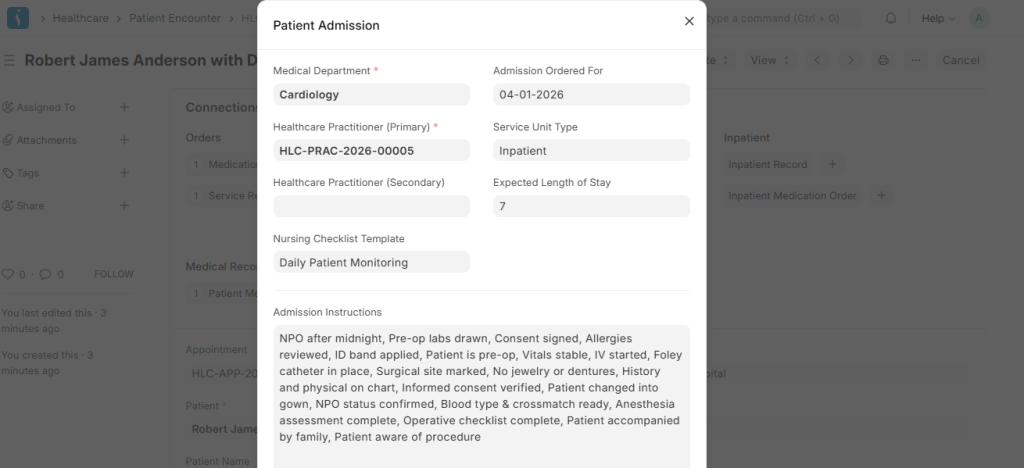
The Inpatient Module manages patients admitted to the hospital for treatment. Moreover, it helps hospital staff monitor medications, treatments, and patient activities throughout the admission period.
● Inpatient Record: The Inpatient Record stores patient admission details, assigned rooms or beds, doctors, and treatment plans. Therefore, hospitals can monitor the patient’s stay until discharge.
● Inpatient Medication Order: Doctors use this feature to prescribe medicines for admitted patients. It records medication names, dosage, frequency, and duration for accurate treatment management.
● Inpatient Medication Entry: Nurses and hospital staff use this feature to confirm medication administration. As a result, hospitals can ensure patient safety and proper medication tracking.
5. Laboratory
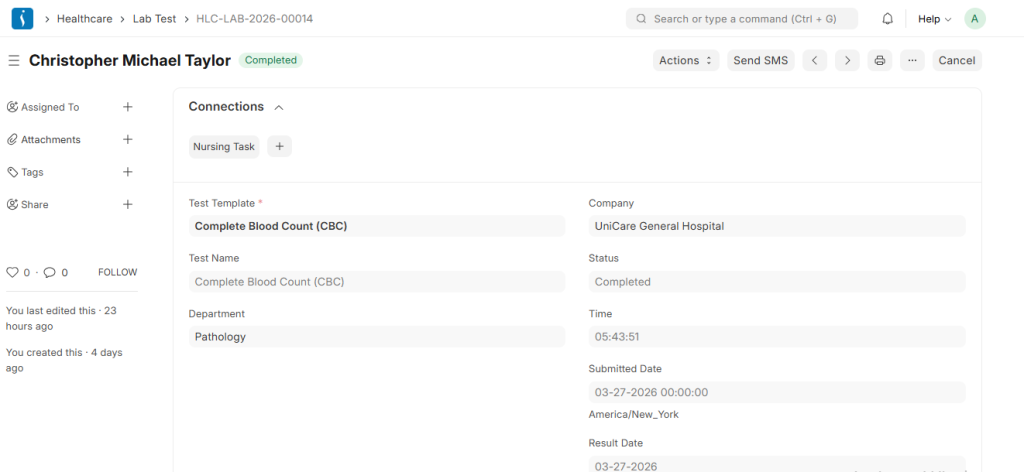
The Laboratory Module manages the complete diagnostic testing process, from sample collection to report generation. In addition, it helps laboratories maintain accurate records and deliver timely test results.
● Lab Test: Doctors create Lab Tests for diagnostic procedures such as blood tests, urine analysis, and other laboratory investigations. After completing the test, technicians upload the results into the system for diagnosis and treatment planning.
● Sample Collection: The Sample Collection process records patient samples such as blood, urine, or saliva before testing begins. Consequently, laboratories can maintain proper sample tracking and accuracy.ory.
6. Nursing
The Nursing Module helps hospitals manage nursing activities and patient care tasks effectively. Furthermore, it improves coordination between doctors and nursing staff.
● Nursing Task: Nurses receive assigned patient care activities such as medication administration, vital sign monitoring, and wound dressing. Therefore, nurses can complete tasks on time and maintain quality care.
● Healthcare Activity: This feature records daily patient care activities, including health monitoring and treatment support. In addition, it maintains a complete history of nursing actions.
● Nursing Checklist Template: The Nursing Checklist Template provides standard procedures for nursing activities. As a result, hospitals can improve care quality and reduce operational errors.

7. Rehabilitation and Physiotherapy
The Rehabilitation and Physiotherapy Module is designed to manage the treatment and recovery process of patients who require physical therapy or rehabilitation. This module helps physiotherapists assess patient conditions, create therapy plans, monitor progress, and maintain complete medical records throughout the rehabilitation journey.
● Therapy Session: A Therapy Session records each physiotherapy session conducted for the patient. It includes details such as the therapist, exercises performed, session duration, and patient response to the treatment.
● Patient Assessment: Patient Assessment is used to evaluate the patient’s physical condition, mobility, pain level, and overall health before starting therapy. This helps the therapist understand the patient’s needs and plan appropriate treatment.
● Therapy Plan: A Therapy Plan defines the complete rehabilitation program for the patient. It includes the type of therapy, exercises, session frequency, and treatment duration.
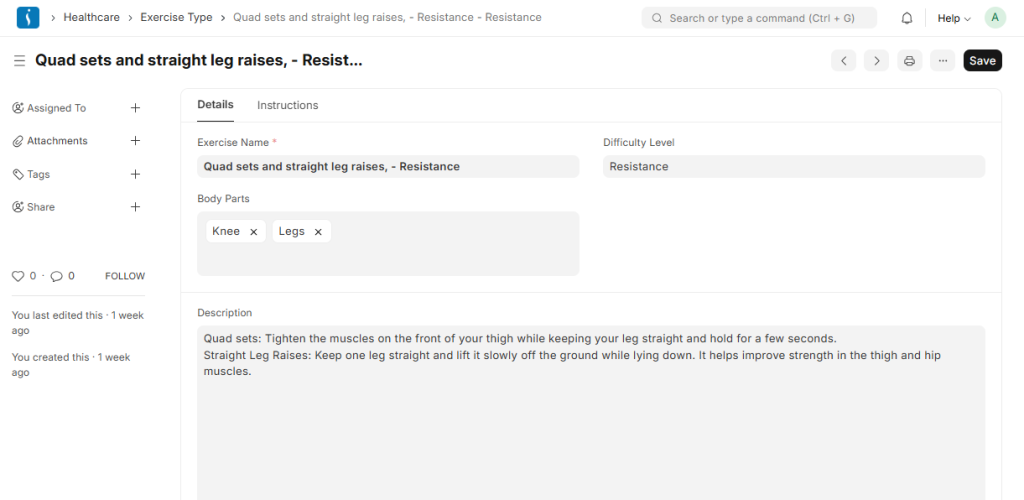
● Exercise Type: Exercise Type lists the different exercises used during physiotherapy sessions, such as stretching, strengthening exercises, balance training, or mobility exercises.
● Therapy Type: Therapy Type categorizes the different types of therapies provided in rehabilitation, such as physiotherapy, occupational therapy, or acupuncture therapy.
● Therapy Plan Template: This template helps create standardized therapy plans that therapists can reuse for patients with similar medical conditions.
● Patient Assessment Template:
This template provides a structured format for evaluating patient health conditions during the assessment process.
8. Diagnostic
The Diagnostic Module in a healthcare ERP is used to manage and record patient diagnostic results in a structured and efficient way. It helps doctors and laboratory staff analyze test results, track observations, and generate accurate medical reports for better diagnosis and treatment decisions.
● Diagnostic Report: A Diagnostic Report is the final report generated after a lab test or diagnostic procedure. It contains the patient details, test results, and conclusions based on observations. Doctors use this report to diagnose the patient’s condition and plan further treatment.
● Observation: Observation refers to the individual test result values recorded during a diagnostic test, such as Hemoglobin level, WBC count, RBC count, or Platelets. These observations form the basis of the diagnostic report.
● Observation Template: An Observation Template is a predefined structure that defines which observations should be recorded for a specific test. For example, a Complete Blood Count (CBC) template may include Hemoglobin, WBC, RBC, and Platelets as standard observations.
9. Service Units
The Service Units Module in a healthcare ERP is used to manage the physical service locations where medical care is provided to patients. It helps hospitals organize their facilities such as rooms, wards, beds, and treatment areas, ensuring that patient services are delivered in the correct location.
● Healthcare Service Unit: A Healthcare Service Unit represents a specific location or facility in the hospital where healthcare services are provided. Examples include patient rooms, ICU beds, operation theatres, consultation rooms, or dialysis units. These units help hospitals assign patients to appropriate locations during treatment or admission.
● Healthcare Service Unit Type: Healthcare Service Unit Type defines the category of service units available in the hospital. For example, types may include Ward, ICU, Operation Theatre, Consultation Room, or Emergency Room. This classification helps organize service units and manage hospital resources more effectively.
10. Consultation Setup
The Consultation Setup Module in a healthcare ERP defines the foundational elements required for patient consultations. It standardizes appointments, procedures, prescriptions, and treatment planning, enabling doctors and healthcare staff to deliver consistent and organized care. This setup ensures smooth workflows during consultations and accurate medical documentation.
● Appointment Type: Defines different types of patient appointments, such as general consultation, follow-up, telemedicine, or emergency visit. This helps schedule patients efficiently and allocate the right resources.
● Clinical Procedure Template: A predefined template for medical procedures that doctors frequently perform, such as IV drip, wound dressing, minor surgeries, or injections. It ensures consistency in recording procedures during consultations.
● Treatment Plan Template: Provides a standardized framework for treatment plans, including therapies, medications, or follow-ups. It helps doctors quickly create structured plans for patients with similar conditions.
● Dosage Form: Specifies the form in which medication is administered, such as tablet, syrup, injection, or ointment. This ensures correct prescription details for pharmacy and patient use.
● Prescription Dosage: Records the amount of medication to be given at each administration, ensuring patients receive the correct dose.
● Prescription Duration: Defines how long a patient should take the prescribed medication, helping track treatment timelines and ensure adherence.
● Complaint: Captures the patient’s reported symptoms or health issues during consultation. It serves as the basis for diagnosis and treatment.
● Diagnosis: Records the doctor’s medical assessment of the patient’s condition based on symptoms, tests, and observations. This guides treatment and follow-up care.
11. Laboratory Setup
The Laboratory Setup Module provides the foundational configurations required for smooth laboratory operations. It ensures that lab tests, samples, measurements, and diagnostic procedures are standardized, making lab workflows accurate and efficient.
● Lab Test Template: A predefined template for common lab tests, such as Complete Blood Count (CBC), Liver Function Test, or Urine Analysis. It standardizes the observations, parameters, and procedures for each test, ensuring consistent results.
● Lab Test Sample: Defines the type of sample required for a lab test, such as blood, urine, saliva, or tissue. This ensures correct sample collection and proper identification for each test.
● Lab Test UOM (Unit of Measurement): Specifies the measurement units for test observations, like mg/dL, g/L, cells/mcL, or percentages. This standardization ensures accurate recording and interpretation of
lab results.
12. Report
The Reports Module in a healthcare ERP provides insights and analytics that help hospitals and clinics make informed decisions.
● Patient Appointment Analytics: This report tracks and analyzes patient appointments, including appointment volume, cancellations, no-shows, and practitioner availability. It helps hospital administrators optimize scheduling, manage workloads, and improve patient flow.
● Lab Test Report: This report provides a summary of laboratory tests conducted, their results, and observations. It helps track lab performance, monitor test outcomes, and support diagnostic decision-making by doctors.
Benefits of Using Unicare Healthcare System
Implementing UniCare ERP System offers multiple benefits for hospitals and clinics.
Improved Efficiency
The system streamlines workflows across departments and reduces administrative workload.
Reduced Errors
UniCare minimizes manual mistakes in patient records, billing, and reporting processes.
Better Patient Care
Healthcare providers can reduce waiting times and track treatments more accurately.
Centralized Data Management
The platform provides real-time access to patient information, reports, and analytics.
Stronger Department Coordination
Doctors, nurses, laboratory staff, and administration teams can collaborate more effectively.
Regulatory Compliance
Hospitals can maintain accurate records and simplify audit and compliance processes.
Why Hospitals Need Uni Healthcare?
Today, hospitals face increasing patient loads and growing operational complexity. Therefore, adopting a modern healthcare management system has become essential for healthcare organizations.
UniCare ERP System helps hospitals:
- Reduce administrative burden on staff
- Improve coordination between clinical and non-clinical departments
- Increase operational transparency
- Support better decision-making through real-time insights
- Enhance patient satisfaction with organized healthcare services
- Improve overall productivity and workflow management
Furthermore, the system helps healthcare providers deliver high-quality services while managing resources more efficiently.
Conclusion
UniCare ERP System transforms traditional hospitals into modern, efficient, and patient-focused healthcare facilities. By integrating all hospital operations into a single platform, the system helps hospitals save time, reduce errors, and improve workflow management.
Moreover, hospitals that adopt UniCare gain a competitive advantage through better data accuracy, improved departmental coordination, and enhanced patient satisfaction. As a result, healthcare organizations can deliver better medical services while achieving long-term operational efficiency.